Tuesday, August 03, 2010

Cloning Your Hard Disk

Recently I've just bought myself a new hard disk to replace the old one. I got myself a Samsung Spinpoint F3 750GB to replace the old Western Digital Caviar Blue 320GB. Now, one easy way to install this new hard disk is to just plug it into my PC, and I'm good to go. I would end up with two hard disks. The old one would be intact, my windows and programs would still be there, and I would get an extra 750GB of free space in the new hard disk. But the problem was, I was running short on cash, so I had to sell the old 320GB hard disk. That meant I had to reinstall my windows on the new hard disk, reinstall the drivers for the motherboard, the graphic card, softwares, games, backup my files, etc. It's just too much hassle. So I googled for a way to move the entire content of the old hard disk to the new one. Some suggested making back-up DVDs, or use Norton Ghost, or some other softwares. After a while, I found a pretty neat software which allows you to copy the entire content of your old hard disk to the new one, without having to reinstall windows or any drivers, and you could just run it from windows without having to burn a boot CD.

I present you, EASEUS Todo Backup 1.1!

This is a great software if you would like to:

  • Upgrade to a new hard disk without having to reinstall windows, programs, drivers, stuffs.
  • Would like to make an exact, bootable copy of your hard disk, for back-up purposes.
  • Planning to get a new hard disk, but you lost your windows installation CD, and other CDs.

When I first found it, I thought it was supposed to be EASUS as in E-Asus, 'cos Asus is a famous brand. But it turned out that this software is not related to Asus in any way. So back to the topic, this software is totally free. You can get it from here: http://www.todo-backup.com/download/

Yes, it's totally free. This is the fully functional version, and not some 7-days trial bullshit with limited functions whatsoever. EASEUS, I salute you. By the way, you can see that it supports Windows 2000/2003/XP/Vista/2008/Windows 7. And in my case, I'm using Windows 7 32-bit, and it worked fine. The download file is a .zip file, so make sure you have WinZIP or WinRAR before proceeding.

*For your information, EASEUS has another software with similar functions, which is EASEUS Disk Copy. It's totally free as well, but this one is actually an image file (.iso) which you have to burn to a blank CD and use it as a boot CD. I only had a blank DVD, and I tried burning the stuff to a blank DVD, but for some reason the burning process always had an error no matter what kind of software I was using (Nero, Windows, PowerISO, etc.). So I don't know what's actually causing the problem. It could be my DVDs, or my burner, or the burning softwares, or the image file itself. Therefore I would recommend EASEUS Todo Backup rather EASEUS Disk Copy to clone your hard disks, although the name of the latter seems to be more relevant to the purpose.

After you have finished downloading the software, proceed with the installation. Things to make sure before you run the software:
  1. Make sure you have both hard disk plugged into the PC (the source disk that you want to clone, and the destination disk where you would like to put the cloned data in). I would recommend plugging out your DVD-ROM's SATA cable and power cable, and temporarily connecting them to your new hard disk. This way, you don't need to find an extra SATA cable or a SATA power connector. By the way, you don't have to format the destination hard disk, as the software will automatically do it for you. Even if the new hard disk does not appear in your computer (since it's new and the partition is unallocated), you don't need to worry as the software would be able to detect the destination disk even if it's still unformatted.
  2. The destination disk needs to be the same size or bigger than the source hard disk. In my case, the destination disk is 750GB while the source is 320GB.
  3. Close all other programs before running the software. You could continue downloading your torrents later.
When you have all of the above in check, run the software. It should look like this:
In the main window, choose "Clone Disk", and a new window will pop out. It will then ask you to select the source disk, and the destination disk. Please don't get this mixed up. You need to take note of the model (Samsung, Western Digital, etc) and the capacity of at least one of the hard disks if you don't want to mess things up.

Just click next, next, and next, and the software will do everything for you. It's a very user-friendly software, so I doubt you could actually fuck things up. It took me roughly a couple of hours to copy the 250GB worth of data from my 320GB hard disk. The time needed to complete the disk cloning is proportional to the size of used disk space, not the hard disk capacity itself. A 320GB hard disk with no free space will take twice as long to copy compared to a half-full 320GB hard disk.

After the software has finished cloning the hard disks, just shut down your computer, take out the old hard disk, and put the new one in it's place. If you used your DVD-ROM's SATA cable and power connector to temporarily connect the new hard disk while copying, like I recommended, just plug in the cables back to the DVD-ROM, and plug in the cables from the old hard disk to the new one. Boot up your computer, and that's it! Boots perfectly fine, no driver conflicts, installed programs and games run perfectly fine, saved game data is intact, no missing files, etc. It's just like having your old hard disk plugged back in. And for your information, the data in the old hard disk is still preserved, just in case the cloning is not successful.

The final result in my case, is the exact copy of my old hard disk in the new one, plus 400+GB of free unallocated space since my destination disk is bigger than the source disk. I just need to format the unallocated space and I'm good to go. That's all for now. Thanks for reading.

Wednesday, July 28, 2010

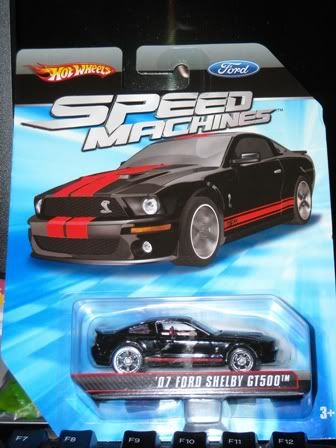
'07 Ford Shelby GT500: HW SM

Another Hot Wheels Speed Machines haul from the recent batch.

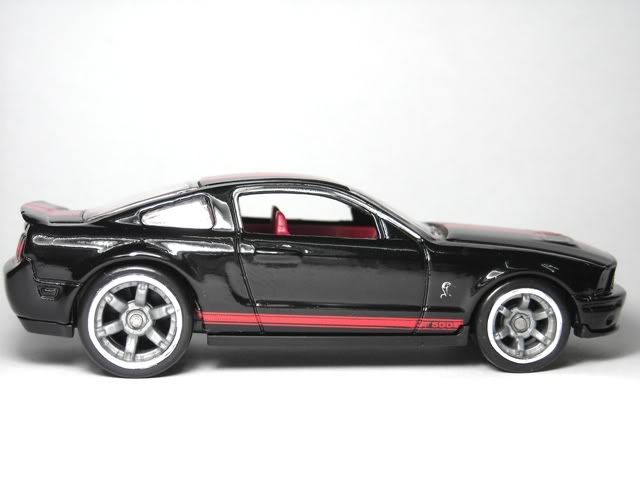
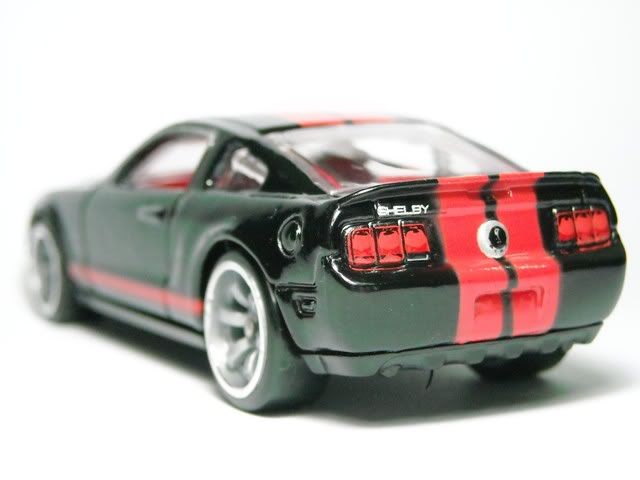
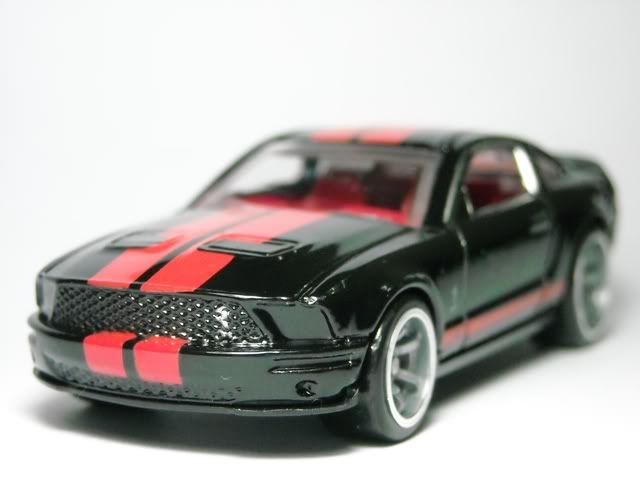
'07 Ford Shelby GT500

Red and black usually go well together. But not this time. Nevertheless, it is still a lovely car.

There's actually a bit of chipped paint on the boot. But it's not visible in this picture 'cause I've photoshopped the thing. Mattel should really do something about their quality control. I don't mind smudged or misaligned tampos, but chipped paint? Did the car went through some sort of rally course before being sold?

If you look carefully at the front grille, there's a speck of silver paint visible on the left side of the grille. Although it may not look like it, that's supposed to be the Shelby logo.

Monday, July 26, 2010

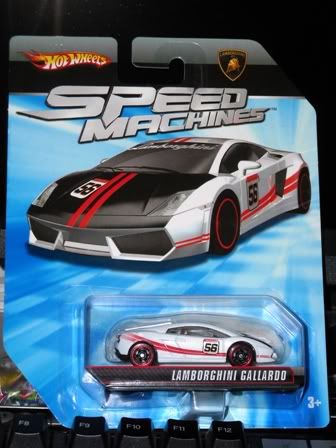
Lamborghini Gallardo: HW SM

I'm not a really big fan of Lamborghini, but this particular Speed Machines cast from Hot Wheels caught my eye:

Lamborghini Gallardo LP560-4 from Hot Wheels Speed Machines

Very few white cars with black hood could manage to look this good. Now if you look carefully, you'll notice that the black paint and the red stripes on the hood of the pictured car on the card extend to the upper portion of the front bumper. But in the cast itself, they're limited to the hood. But it looks just as good, if not better.

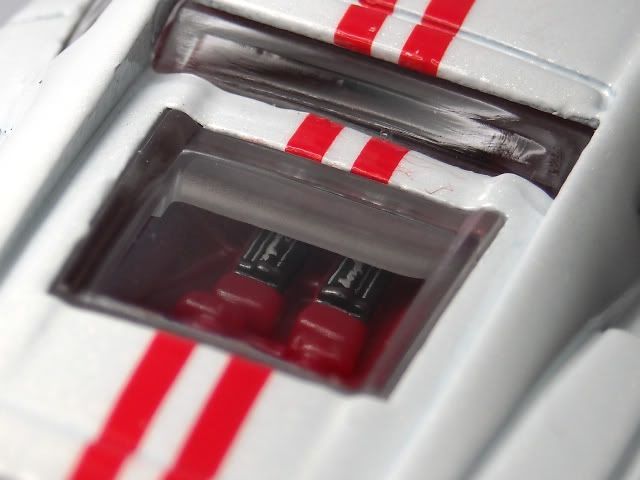
A closer look at the engine bay. I suppose the scribblings on the engine cover is supposed read 'Lamborghini'. Though it's not exactly detailed to the point where you could actually read the word 'Lamborghini', you gotta respect the extra effort they took to paint the engine cover. At least it's better than nothing.


Looks equally stunning from the back. It would be really great if they painted the exhaust tips as well. The Lamborghini tampo on the boot is slightly off-center, but it still looks acceptable.

And here's the 3D version in Need for Speed Shift. Hope you guys like it. :)

Thursday, July 22, 2010

Birthday Cupcakes!

It was my girlfriend's birthday last week, and I got her cupcakes as her birthday cake, 'cos she had been asking for them ever since she saw the cupcakes at one of my friend's birthday. And this was the cake I ordered:

I just told the nice lady in the bakery to write Happy, 23, B'day, Sayang, I, Love, U, and XOXO on one cupcake each, and put them in the middle row. For the top and bottom row of cupcakes, I told her that she could design them however she likes, as long as they're pretty.

If you're getting bored of the usual one huge piece of cake as a birthday cake, you could try cupcakes for a change. I ordered mine from Kedai Kek Bukit Idaman in Bukit Idaman, Selayang. The price is reasonable, the cakes are pretty and tasty, and the staffs are very friendly. By the way, if you like sweet icings, you should ask for the royal icing. They cost a bit more, but in my opinion, they taste better, and they don't melt easily, in case you don't have a fridge. The one I ordered was the normal icing, and it tastes pretty much like the normal icing on a cake. Not as tasty as the royal icing, but still tasty nevertheless.

Tuesday, July 20, 2010

Kursus Pra Perkahwinan. Susah?

Salam sejahtera and salam satu Malaysia. Post kali ni dalam Bahasa Melayu rojak, sebab aku rase lebih sesuai. Senang sikit nak cite. Anyway, baru2 ni aku ade pegi satu kursus kat Shah Alam. Kursus bukan sebarang kursus, kursus pra perkahwinan beb. Ikutkan hati, aku malas nak pegi kursus2 camni. Bukannye ape, ilmu2 agama ni aku lemah sikit, especially bab2 tajwid nih, tunggang-langgang. So segan la nak pergi kursus2 ni, kang tak pasal2 die tanye soalan pelik2, mampus ternganga tak boleh nak jawab. Tapi dah awek ajak pegi, so kena la ikut sekali. Takkan die sorang je yang nak amik kursus kahwin, macam pelik la pulak. So fine, aku pegi je la... Tengok2, kursus pra perkahwinan ni punya la senang. Memang tak payah risau ape2 pun. Kalau korang fail pendidikan Islam pun, xde masalah. Pegi je. Konfem boleh pas kursus ni. So ape yang dorang actually buat kat kursus ni? Kepada para pembaca yang masih belum mengambil kursus pra perkahwinan, yang tertanya2 apa yg korang kena buat or patut tahu, meh sini aku briefing sikit.

Anyway, kursus yang aku ambil ni anjuran bersama UiTM dan JAIS (Jabatan Agama Islam Selangor), so maybe ade a few things yang lain sikit kalau berbanding dgn kursus2 kat tempat lain.

So mule2 nak kena buat ape? Kena la tunggu mana2 agensi atau pihak menganjurkan kursus pra perkahwinan. Die bukan tiap2 hari ade. So korang kena pandai2 la cari kat internet, bile tarikh2 kursus pra perkahwinan tu akan diadakan. Biasanya die akan buat 2 hari, Sabtu ngan Ahad, sebab senang org nak pergi. And bile dah confirm kursus mana nak join, kena la register and bayar yuran. Mase aku daftar tu, die kena daftar 3 minggu sebelum kursus, sebab lepas tu pendaftaran ditutup. So kalau cadang nak pegi kursus, kena la plan awal2. Kalau nak kursus bulan 5, register la dalam bulan 4. Jangan la sehari sebelum atau seminggu sebelum kursus baru nak daftar. Kalau nak selamat, maybe sebulan sebelum kursus tu kira ok la.

Bile dah register nanti, dapat la slip mcmni. Slip ni x gune pun, tapi simpan je la, in case diperlukan. Kalau korang tgk betul2, die ade cakap "yuran pendaftaran tidak dikembalikan", so kalau dah register, tak boleh nak cancel. Kalau cancel jugak, burn la duit yuran tu. Huhu...

Resit pun dapat jugak. Aku punye anjuran UiTM and JAIS, so yuran die murah sikit, RM50 je. Kalau kat luar, paling kurang RM80.

Bile korang pegi kursus tu pada hari yang ditetapkan, korang kena daftar kehadiran kat situ. Pakaian ape pun xpe, asalkan sopan. Tak payah la pakai baju melayu siap dgn songkok dan sampin, kang orang ingat VIP mane pulak nak merasmikan majlis. Aku pegi time tu pakai t-shirt ngan jeans je. Utk perempuan pun same, xyah baju kurung pun xpe, tapi make sure sopan la. Kalau nak freehair pun boleh gak, tapi aku nasihatkan pakai tudung la, sbb takut nanti penceramah tu perli pulak mase bagi lecture. Dah sampai kat tempat mendaftar, sign je nama, pastu dapat la "goodie bag" macamni. Ade ape dlm beg ni? Jom tgk.

Ade buku2. Buku "Memasuki Gerbang Perkahwinan" tu tebal la jugak, standard tebal mcm novel la. Ade ape lagi dlm beg tu?

Yes, buku lagi. Buku2 ni aku x bace pun. By the way, ade jugak borang feedback dlm beg tu, tapi xde gambar nk tunjuk sbb dah bagi balik.

Buku nota pun die bagi jugak, in case korang nak salin important points mase lecture ataupun conteng2 lukis kartun orang lidi untuk mengelakkan mengantuk mase lecture. Kalau malas nak salin pun xpe, sebab points2 yang penting semua ada dlm buku yang die bagi. Tapi die x bagi pen, so korang bawak la pen sendiri.

Selain tu ade jugak pamphlet2 ni dlm beg tu. Senarai pamphlet:
  • Kursus Pra Perkahwinan Siri 2/2010
  • Penjelasan Ringkas Berhubung Kedudukan Wali Dalam Pernikahan
  • Prosedur Permohonan Poligami (Dalam Negeri Selangor) - yg ni budak laki kena simpan elok2 k.. hehe..
  • Jenis-jenis Pernikahan Yang Disyaratkan Mendapat Kelulusan Mahkamah
  • Perkahwinan Menyalahi Enakmen - Apakah Kesannya?
  • Prosedur Mendapatkan Kebenaran / Kelulusan Bernikah Di Negeri Selangor
  • 'Iddah - Menurut Pandangan Islam
  • Menghadapi Masalah Dalam Kehidupan
Dalam pamphlet pertama tu ade tentatif program sekali.
Kalau korang tengok kat sini, yang ade ceramah, makan, ceramah, makan. Tu je. Tapi kat tempat lain, aku dengar ade exam sebelum dapat sijil. So kalau takut nak exam, ambik je la kursus kat dalam UiTM ni. Tapi kalau orang luar aku tak pasti la boleh ke tak. Kalau nak tahu tajuk2 ceramah tu, klik je gambar tu untuk tgk gambar yg lagi besar. Penceramah dorang ok je, especially Ustaz Suhaimi (kalau x silap), die mmg terer buat lawak. Aku jenis yg susah nak gelak ni pun gelak sampai sakit perut. Dah x mcm ceramah dah, mcm tgk Raja Lawak la pulak. Penceramah lain pun ok jugak, xde yang garang ke ape pun. Semua baik2 je. By the way, dorang sediakan makanan untuk breakfast, lunch, ngan tea break. Makanan memang sedap2. Lauk 2-3 jenis, semua best. Entah la dorang cater kat mana, semua masakan panas2. Or maybe sebab sejuk and lapar setelah dengar lecture berjam2 dlm dewan kuliah yg aircon kuat tu, sbb tu makan ape pun sedap. Oh, sebelum terlupa, kalau jenis yg x tahan sejuk tu, bawak la sweater. Aku first day tak bawak sweater, so mmg terketar2 la dlm lecture hall tu.

Aku ade dengar, yang kursus pra perkahwinan ni, sijil die tahan 3 tahun la, setahun la, sampai bile2 la, etc. Yg tu aku x boleh nak confirmkan. Tapi menurut sorang ustazah ni, sijil yg kitorang dapat mmg tahan sampai bile2. Dalam salah satu pamphlet tu pun ade cakap mcmtu:
Hopefully betul la...

Lepas dengar ceramah, gelak2, makan sedap2, akhirnya dapat la sijil pra perkahwinan macam di atas ni... Bukan sijil kahwin atau sijil nikah tau. Sijil pra perkahwinan baru.. Anyway, aku dengar dorang nak buat kursus pra perkahwinan ni lain sikit di masa hadapan... dorang nak buat 3 hari 2 malam. And ade bnyk practical, bukan lecture je. Hehe... So kalau xnak amik kursus 3 hari 2 malam, baik ambik awal2. Pegi pukul 8, balik pukul 5. So kesimpulannya, kursus pra perkahwinan ni teramat la senang. Tak seperti yang aku sangkakan... Ribuan terima kasih buat pihak Pusat Pemikiran dan Kefahaman Islam UiTM (CITU) dan Jabatan Agama Islam Selangor (JAIS). Sekian.. :)